
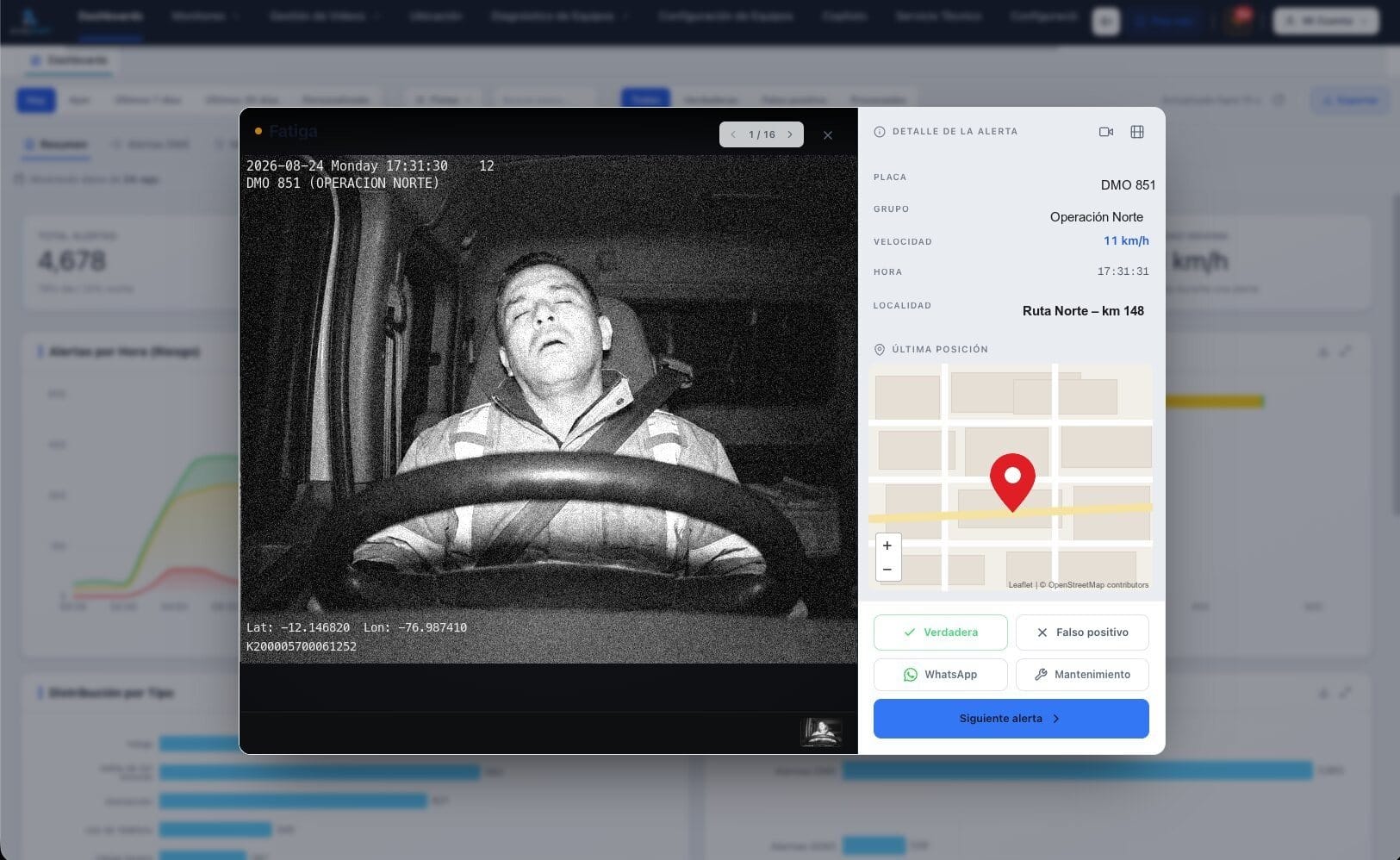
To choose an anti-fatigue camera for your fleet, check eight points: which behaviors it detects, whether it sees at night, whether it only beeps or also records the event, who reviews the alerts, whether it works without signal, how long installation takes, how many cameras each vehicle can carry and which platform receives the data. This guide explains each criterion with what the Endeavant anti-fatigue camera does.
The real difference is between a sensor that sounds in the cab and a system that also keeps the video, sends it to a control center and records what was done about it. At the end there is a table comparing both categories and a list of questions to ask any supplier.
Which behaviors should an anti-fatigue camera detect?
At a minimum, the signs of sleep: closed eyes, head nodding and yawning. A fleet camera measures how long each gesture lasts before it classifies the event, so a normal blink does not trigger an alert and a microsleep does. It should also detect the behaviors that distract the driver:
- Fatigue and drowsiness: sustained closed eyes, microsleep and head nodding.
- Yawning: frequency and mouth opening, an early sign of tiredness.
- Phone use: the phone in hand or at the ear while driving.
- Distraction: gaze off the road and sustained head turn.
- Smoking: a lit cigarette in the cab.
- Covered lens: covering the lens does not switch the camera off; it is reported as an event.
- Driver change: on Avant 5 and Avant 8, biometric recognition of who is driving.
At 100 km/h, a 3-second microsleep is about 83 metres without control. How the camera measures eyelid closure and nodding is covered in our guide to AI driver fatigue detection.
Does it see at night and in a dark cab?
It has to. Night and early-morning shifts are part of fleet operations, so the camera needs infrared light to see the face in a dark cab. Ask whether that light has a photobiological safety certificate: the Endeavant anti-fatigue camera does, so the infrared does not harm the driver's eyes, and it has a shield that dims the glow inside the cab. For drivers with glasses, the technician sets the sensitivity at installation and checks detection with your drivers before handing over the vehicle.
Does it only beep, or does it also record the event?
This is the criterion that separates the two categories most. A beep-only sensor warns the driver and that is the end of it: no evidence is left. A fleet system alerts in the cab and also uploads the event with its video:
- In the cab: voice warning and seat vibration; on Avant 5 and Avant 8, also an alert light for noisy cabs.
- Event video: 15 seconds before and 15 after, one MP4 per camera, with plate, speed, time and location.
- How long it is kept: the clip stays on the platform for 12 months.
Who reviews the alerts?
An alert nobody looks at corrects nothing. Ask who sees the event after the in-cab warning: only the driver, a screen someone checks when they can, or operators on duty around the clock. At Endeavant's 24/7 Control Center an operator reviews the video, confirms whether the alert is real or a false positive, talks to the cab if the driver is still at risk and notifies your supervisor on WhatsApp with the evidence. Who handled it, when and what action was taken is recorded.
Does it work without signal?
It has to. If the camera needs to query a server to decide, it does not warn on a stretch without coverage. The Endeavant anti-fatigue camera processes on board: the in-cab alert is identical with or without signal, also underground or on high-altitude routes. Without signal, the video stays in the unit's memory with time and position, and uploads to Endeavant Cloud on its own when coverage returns.
How long does installation take and how many cameras does each vehicle carry?
Between 2 and 3 hours per vehicle, with Endeavant technicians in northern, central and southern Peru. The camera sits on the dashboard facing the driver, in a bolted metal housing so that installation and calibration hold up to vibration and dust. A protective case covers the connections, the SIM and the micro SD: to disconnect the unit or remove the card it has to be opened. Thresholds, sensitivity, voice messages and users are configured the same day.
Each vehicle can carry 1 to 8 cameras depending on what you want to cover: the driver, the road, the sides, the rear. The road-facing camera adds the alerts of the ADAS anti-collision system: forward collision, lane departure, headway and pedestrians. What each unit includes is on DMS and ADAS cameras.
Does it work as evidence after an incident or a claim?
Only if it keeps the video. After an incident what you need is to see what happened seconds before, with time, speed and place. The clip of 15 seconds before and 15 after, kept for 12 months, lets you reconstruct the event, show that the alert was handled and answer a claim with data. A beep-only sensor leaves nothing to show.
Which platform receives the data?
The camera is half the system; the other half is where each alert is handled. In Endeavant Cloud each event opens with the video, plate, speed, time, place and the shift driver, who checks in by scanning the vehicle's QR code with their phone. From the same screen the alert is classified, the full video is requested by date, time and camera, the route is shown and reports are scheduled by email or WhatsApp with the routes, shifts and drivers with the most risk.
A basic sensor or a system with video and a control center?
Both categories warn in the cab. What changes is what happens after the warning:
| Criterion | Basic sensor | System with video and control center |
|---|---|---|
| In the cab | A beep | Voice warning and seat vibration |
| Evidence | None | Video 15 s before and 15 s after, plate, speed, time and location |
| Who finds out | Only the driver | 24/7 control center and the supervisor on WhatsApp |
| False positives | Not told apart | An operator confirms whether the event is real or false |
| Follow-up | None | Voice to the cab and reports by route, shift and driver |
| Without signal | Not applicable | Same alert; the video uploads when signal returns |
What should you ask the supplier before buying?
- Which behaviors does it detect besides closed eyes?
- Does it see at night with infrared? Does that infrared have a photobiological safety certificate?
- Does it record the event video? How many seconds, and for how long is it kept?
- Who reviews each alert, and during which hours?
- Does the alert work without signal? What happens to the video on that stretch?
- How long does installation take, and who does it in your area?
- How many cameras per vehicle does the unit support?
- What happens if the driver covers the lens?
FAQ: choosing an anti-fatigue camera
What should a fleet anti-fatigue camera detect?
Closed eyes, microsleep, head nodding and yawning, which are the signs of sleep, plus phone use, distraction, smoking and a covered lens. The Endeavant anti-fatigue camera measures how long each gesture lasts before classifying the event, so it tells a normal blink from a microsleep.
What is the difference between a basic anti-fatigue sensor and a system with a control center?
A basic sensor sounds in the cab and that is the end of it: it keeps no evidence and only the driver finds out. A system with video and a control center alerts with voice and vibration, uploads the event video with 15 seconds before and 15 after, and a 24/7 operator validates it, talks to the cab and notifies the supervisor on WhatsApp.
Does the anti-fatigue camera work without signal?
Yes. The Endeavant anti-fatigue camera processes on board, so the in-cab alert is identical with or without coverage. Without signal, the video stays in the unit's memory with time and position and uploads to Endeavant Cloud when signal returns.
How long does installation take and how many cameras does each vehicle carry?
Installation takes 2 to 3 hours per vehicle, with Endeavant technicians in northern, central and southern Peru. Each vehicle can carry 1 to 8 cameras depending on what you want to cover: the driver, the road, the sides and the rear.